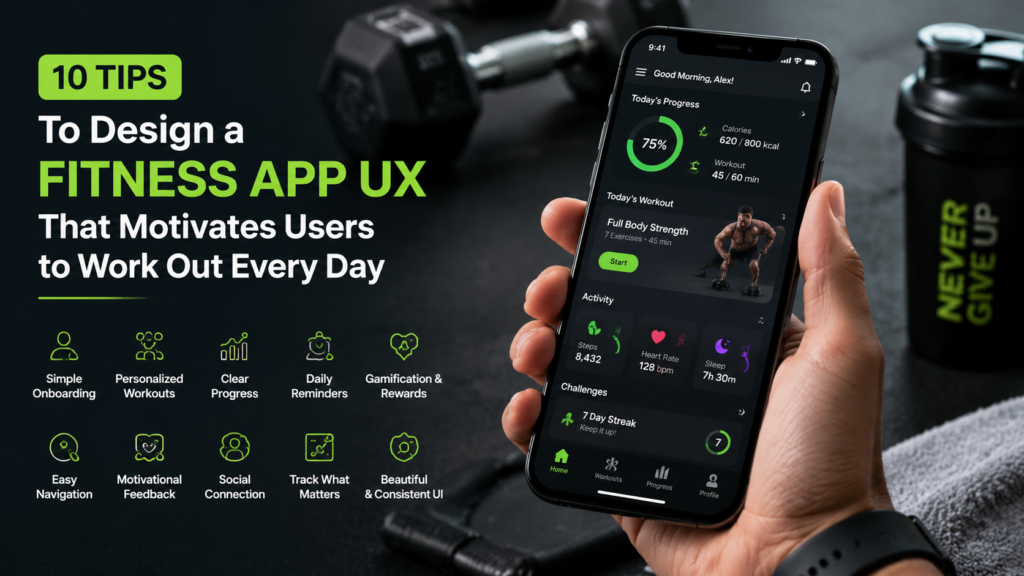
Most fitness apps get downloaded with real excitement and deleted within three weeks. The workouts are usually fine. What fails users is the experience around them.
If you are building a fitness product, working with a Fitness App Development Company that understands behavioral design is one of the smartest decisions you can make. The UX choices from your first few sprints will either turn curious downloaders into committed daily users or give them a quiet reason to move on.
Here are ten tips that separate apps people keep from apps people forget.
1. Treat Onboarding Like a First Conversation
Users arrive at a fitness app with real energy and intention. Honor that by keeping onboarding short. Four screens is plenty. Ask what their goal is, where they are starting, and how many days per week they can commit. When someone finishes onboarding in under two minutes and sees a workout that fits, they build a layer of trust that most apps never earn.
2. Put Personalization to Work on Day One
People get frustrated with home screens really fast. For example a person who is recovering from a knee injury has different needs than someone who is training for their first half marathon. A lot of apps show them the same things. This does not make sense.
When people first use an app they usually tell you something about themselves. You should use this information to make the app feel like it was made for the fitness app users.
So when fitness app users start using the app for the time they should see things that are relevant to them. When fitness app users feel like the fitness app was made for them they will keep using it for a time. They will not get bored like they do with apps that look like templates.
3. Show Progress in a Way That Feels Real
Users need visible proof that they are moving forward. A well-designed dashboard answers one question at a glance: am I getting somewhere? Weekly streaks, personal bests, and session counts all work well here, depending on what your audience genuinely cares about.
Pick two or three metrics that carry real meaning and give those the visual weight they deserve. Crowding too many numbers onto one screen cancels the motivational effect entirely.
4. Celebrate Every Small Win
Fitness app teams often do not realize how important it is to celebrate victories. When someone finishes a walk or does something for five days in a row it is a big deal.
Giving them a badge or a fun animation makes them feel good. This makes it easier for them to start the time. Fitness apps like Strava and Duolingo are really good at doing this. It helps people keep using the app.
5. Make It Easy For Users To Get To Their Workout
If something is hard to do people will not want to do it. If someone has to click on a lot of things to get to their workout they might get frustrated and stop. Fitness apps should make it easy for people to start a workout see what they have to do today and track their progress.
These things should be easy to find. Only take one or two clicks. A simple menu, at the bottom of the screen can make a difference.
6. Design for Real Workout Conditions
Most users open a fitness app when they are sweating a lot. Their hands are wet. Its hard to see in the gym because of the bright lights. There are also machines around them. These conditions are not good for reading text or tapping on tiny buttons.
To make it better use buttons that are easy to tap. Choose colors that’re easy to see, like black and white. Use clear fonts everywhere, in the app.
You could also add a workout mode. This mode would only show three things:
· What exercise you are doing now
· A timer counting down
· The next exercise coming up
This way users can focus on their workout without distractions.
7. Pay Serious Attention to What Immersive Technology Can Do
Fitness app UX has moved well beyond static screens and basic notification banners. AR/VR fitness app development now gives product teams the ability to overlay real-time form coaching through a phone camera, place a virtual trainer in a user’s living room, and simulate running through environments that feel different each session. These features create genuine emotional investment in the workout itself, and that investment is what turns a three-week user into a three-year user.
8. Write Notifications That Sound Human
Push notifications are one of the most misused tools in fitness app design. Send too many and users silence them for good. Send generic ones and your brand starts to feel like spam. Apps that get this right send a small number of well-timed messages that sound like a coach, not a system alert. “You haven’t worked out in three days and your streak is still alive” lands very differently than “Time to exercise!” Give users easy controls over frequency and they will welcome your messages.
9. Build Community Features Around Choice
Accountability helps people form habits. Leaderboards, shared challenges and friend activity feeds work well if teams use them carefully. The important thing is that social features should always be optional. Some users prefer to work out and they should have a complete experience without using social features. A user who ignores community features should still feel like they have the product.
10. Keep Testing Long After You Launch
Launching a product is not the end of user experience work. Regularly run tests on messages notification timing and dashboard layouts. Track where new users stop using the product during the week and try to solve those problems. Short talks, with users even just five minutes often reveal insights that analytics dashboards won’t show.
Final Thought
Every tip here connects to the same idea: make it easier for real people to show up, do the work, and come back the next day. Cut friction wherever it lives. Acknowledge progress consistently. Design for the version of your user who is tired and looking for any excuse to skip. Build that experience well, and you will have a product that earns a permanent spot on someone’s home screen.