EMT and paramedic students need repeated exposure to live monitor displays to build real clinical judgment. A free virtual vital signs simulator gives that access on any device, at any time, with no cost and no hardware required.
EMT and paramedic students share the same core problem at different stages of their training. They know the numbers but freeze when they see them changing on a real vitals monitor for the first time.
The gap between knowing and recognizing is closed by repetition in front of a live display. Hardware monitors are expensive, shared, and rarely accessible outside formal training hours.
A free virtual vital signs simulator that runs in any browser removes every one of those barriers, no booking, no hardware, no cost.
What EMT Students Need From a Vital Signs Simulator
The Real Skill Gap at EMT Level
Most EMT students enter clinical rotations knowing normal ranges from their coursework. That is not the problem.
The problem is reading values as they appear on a live ems training monitor,where numbers update continuously and multiple parameters shift at the same time.
What to Practice as an EMT Student
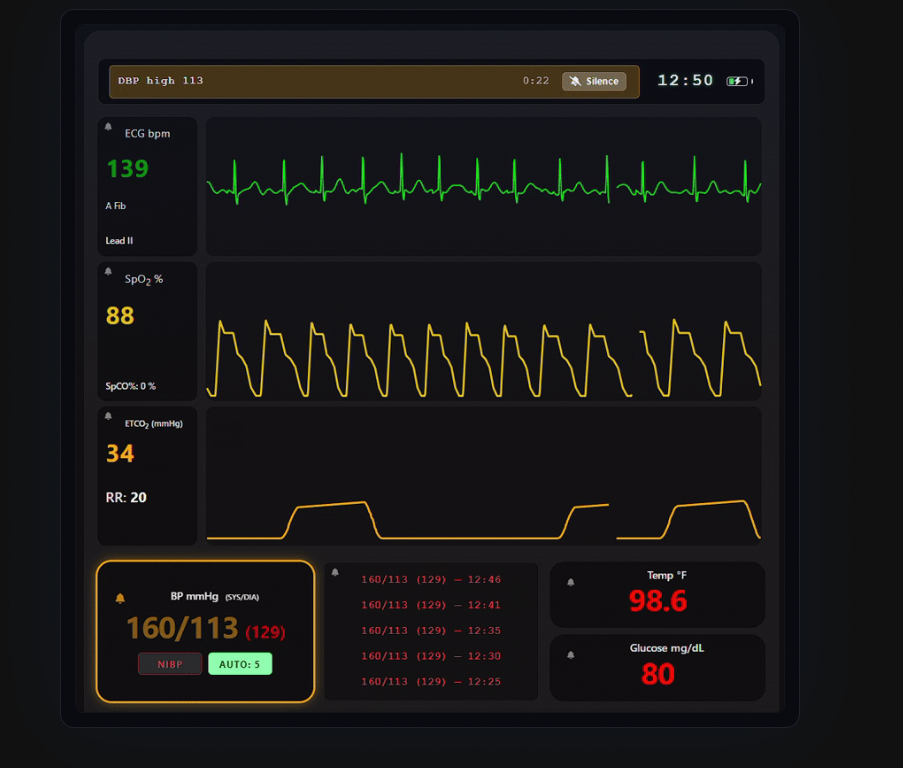
A patient monitor simulator trains the visual scanning skill that comes from real clinical exposure. Students learn to read a full vitals monitor display at a glance, not parameter by parameter.
Specific areas EMT students should focus on:
Tachycardia and bradycardia on a live display — recognizing rate changes as they develop, not only after an alarm fires.
SpO₂ trends — identifying a gradual drop in real time rather than waiting for the number to reach a crisis threshold.
Blood pressure in context — reading BP changes alongside HR and RR rather than interpreting it as a standalone value.
Early deterioration patterns — distinguishing stable borderline readings from a developing clinical emergency across all parameters.
What Paramedic Students Need That Goes Further
Advanced Parameters and Expanded Responsibilities
Paramedic students interpret a significantly wider parameter set than EMTs. EtCO₂ capnography, advanced cardiac rhythms, and medication response tracking all require live display practice to develop properly.
Why the ECG Simulator Matters Most at Paramedic Level
Reading rhythm strips from a textbook develops static pattern recognition. Reading a continuous waveform on a live ecg simulator develops the faster, more intuitive recognition that prehospital cardiac care demands.
The difference is most visible under pressure. Paramedic students who have practiced on a live cardiac rhythm simulator recognize ventricular tachycardia in seconds. Students who only studied printed strips take significantly longer.
What Paramedic Students Should Practice
SVT vs sinus tachycardia — distinguishing these on a moving waveform, not a labeled textbook image.
VT vs VF morphology — reading the differences on a live cardiac rhythm simulator display as they actually appear in the field.
EtCO₂ waveforms — interpreting capnography during airway management and cardiac arrest scenarios.
Shock pattern recognition — using the full vitals monitor display to differentiate septic shock from cardiogenic shock by trend rather than single-point values.
Intervention response — watching how parameters change after a medication or procedure and using that response to guide the next clinical decision.
Why Virtual Practice Builds Real Clinical Judgment
What the Research Shows
Studies comparing virtual simulation to manikin-based training consistently show equivalent outcomes in clinical skill acquisition.
The key advantage of virtual platforms is access removing the scheduling, cost, and equipment barriers that limit how much practice students get before their first real patient encounter.
How Repetition Changes the Brain
A vital signs simulator works because it trains the same cognitive process that years of clinical experience develop.
Every time a student watches a heart rate climb from 88 to 116 on a live vitals monitor while SpO₂ drops and respiratory rate rises, they build pattern recognition that triggers the right response automatically under pressure.
Ten practice sessions on a virtual simulator do not replace clinical exposure. But they ensure students arrive at every clinical hour already familiar with the display, extracting more learning from every minute they spend in a real setting.
What a Free Vital Signs Simulator Must Include
The Minimum Standard for Real Training Value
Not every free tool qualifies as a proper vital signs simulator for EMT and paramedic education. A tool must meet three requirements to actually develop clinical monitor skills.
A live, updating display showing all standard prehospital parameters simultaneously, not one at a time, not on request.
An integrated ecg simulator displaying a continuously moving waveform, not a static strip that students click through.
A realistic interface that mirrors actual prehospital monitor layouts, not a simplified educational diagram.
Why Free and Browser-Based Matters
EMT and paramedic students are typically self-funding their education. Subscription costs on top of program fees are a genuine barrier to consistent practice.
A browser-based tool with no download requirement also means students actually use it between shifts, the night before an exam, or during a study session rather than only when they remember to open a dedicated app.
TrainingMonitor.App is a virtual patient vitals monitor that meets every one of these requirements. It is permanently free, runs in any browser without a login, and displays a full prehospital vitals monitor interface heart rate with live ECG waveform, blood pressure, SpO₂, respiratory rate, EtCO₂, and temperature all updating in real time.
How to Use TrainingMonitor.app in a Training Program
For Instructors Running Live Scenarios
When a program uses TrainingMonitor.app in a structured session, the instructor controls the entire simulation from the instructor controller.
Heart rate, blood pressure, SpO₂, cardiac rhythm, and EtCO₂ can all be adjusted in real time — mid-scenario, without interrupting the flow of the simulation. Students see every change the moment it happens on their own screen.
For Students Practicing Independently
Students access the live display by opening the student monitor display on any internet-connected device — phone, tablet, or laptop.
No login. No download. No session required. The full ems training monitor interface is available immediately for independent practice at any time.
Frequently Asked Questions
Does TrainingMonitor.app work for both EMT and paramedic level training?
Yes, it covers basic vitals monitoring for EMT students and advanced ECG and EtCO₂ simulation for paramedic students.
Is the vital signs simulator completely free with no subscription?
Yes, TrainingMonitor.app is permanently free, sponsored by MedTechKits.com with no trial period or hidden fees.
Can students use it independently without an instructor?
Yes the display runs as a standalone vital signs simulator that students can access anytime on any browser-enabled device.